
Pentest-Tools.com Review: The Ultimate Cloud Pentesting Platform for Beginners (2025)

Disclosure: This post contains affiliate links. When you purchase through these links, we may earn a commission at no additional cost to you.
TL;DR - Why Pentest-Tools.com is Perfect for Noobs
Bottom Line: Pentest-Tools.com is like having a senior penetration tester as your mentor. It gives you professional-grade security testing tools without the steep learning curve, making it perfect for beginners who want to level up their hacking skills fast.
Best For:
- Security noobs who want to start pentesting professionally
- Students learning ethical hacking
- Small security teams needing enterprise-level tools
- Anyone who wants to automate their security workflow
What Makes Pentest-Tools.com Different?
Built by Actual Pentesters, Not Just Developers
Here's the thing that hooked me: Pentest-Tools.com was created in 2013 by a team of professional penetration testers who got tired of juggling 15 different tools just to complete one security assessment. They built the platform they wished existed when they were starting out.
The result? A cloud-native platform that feels like having a senior pentester guiding your every move, with over 2,000+ security teams in 119+ countries trusting it for their daily work.
The Numbers Don't Lie
- 6.3 million vulnerability scans performed annually
- 1.6 million scheduled cloud-based scans yearly
- 15,000+ vulnerability detections and custom exploits
- 90% faster report generation than manual methods
- #1 ranked in detection accuracy against Qualys, Nessus, and OpenVAS
Core Features That Matter for Beginners
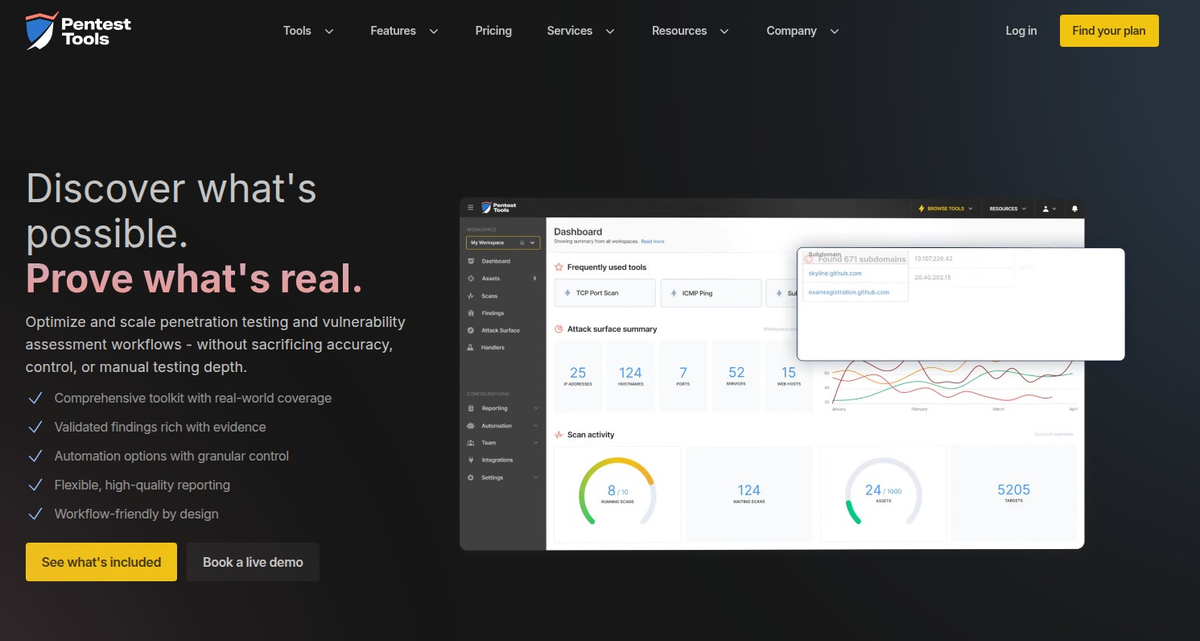
1. Attack Surface Mapping (The Recon Phase)
What it does: Automatically discovers all the digital assets your target has exposed to the internet.
Why beginners love it: Instead of manually running multiple tools, you get a complete picture with one click.
Key Tools:
- Subdomain Finder - Discovers hidden subdomains
- TCP Port Scanner - Maps open services
- URL Fuzzer - Finds hidden directories and files
2. Vulnerability Scanning (Finding the Weak Spots)
What it does: Identifies security vulnerabilities in web applications and networks using machine learning to reduce false positives.
Why it's beginner-friendly: The platform explains each vulnerability found, its risk level, and how to exploit it safely.
Standout Features:
- Website Vulnerability Scanner - Detects SQL injection, XSS, and 75+ other web app vulnerabilities
- Network Vulnerability Scanner - Combines 4 detection engines for comprehensive coverage
- Authenticated Scanning - Tests vulnerabilities behind login pages
3. Exploitation Tools (Proving Impact)
What it does: Safely exploits vulnerabilities to demonstrate real-world risk.
Why beginners need this: Learning to exploit vulnerabilities ethically is crucial for understanding impact and writing compelling reports.
Key Features:
- Sniper Auto-Exploiter - Automatically exploits critical CVEs
- SQL Injection Exploiter - Demonstrates database compromise
- XSS Exploiter - Shows cross-site scripting impact
4. Pentest Robots (Automation Magic)
What it does: Chains multiple tools together to create automated testing sequences that mimic real attacker workflows.
Why it's a game-changer: You can automate complex testing scenarios without writing a single line of code.
Real User Examples: How Beginners Use Pentest-Tools.com
Example 1: Sarah, Cybersecurity Student
"I was struggling with my OSCP prep because I kept forgetting which tools to use in which order. Pentest-Tools.com's Pentest Robots basically gave me a step-by-step playbook. I could focus on understanding the vulnerabilities instead of memorizing command syntax."
Example 2: Mike, Junior Security Analyst
"My manager asked me to do a security assessment of our new web app. I had no idea where to start. Pentest-Tools.com's Website Scanner found 12 critical vulnerabilities in 30 minutes, complete with proof-of-concept exploits and remediation steps. The auto-generated report saved my career."
Example 3: Jessica, Freelance Security Consultant
"Before Pentest-Tools.com, I was spending 60% of my time on reconnaissance and basic scanning. Now I spend that time on advanced manual testing and client communication. My income doubled in 6 months because I could take on more clients."
Pricing: What You Actually Get
Starter Plan (~$300/month)
- Perfect for: Individual learners and small projects
- Includes: Basic scanning tools, limited assets
- Best Use Case: Students practicing on personal projects
Professional Plan (~$800/month)
- Perfect for: Freelancers and small security teams
- Includes: All scanning tools, Pentest Robots, professional reporting
- Best Use Case: Regular client work and compliance assessments
Enterprise Plan (Custom Pricing)
- Perfect for: Large organizations and MSPs
- Includes: Everything plus team management, advanced integrations
- Best Use Case: Managing multiple clients and large attack surfaces
Note: Exact pricing varies based on assets scanned per month. Check their website for current rates.
Pentest-Tools.com vs. The Competition
vs. Nessus
- ✅ Better: Web application testing, cloud-native, no installation needed
- ❌ Trade-off: Less extensive network scanning plugins
vs. Acunetix
- ✅ Better: Pricing transparency, integrated exploitation tools, automation
- ❌ Trade-off: No on-premise deployment option
vs. Qualys
- ✅ Better: Ease of use, faster results, better for small teams
- ❌ Trade-off: Less enterprise vulnerability management features
Who Should NOT Use Pentest-Tools.com
Skip it if you:
- Need on-premise deployment (compliance requirements)
- Primarily do internal network assessments
- Want to build custom scanner modules
- Have a massive enterprise with complex compliance needs
Getting Started: Your First 30 Days
Week 1: Learn the Basics
- Sign up for the free trial
- Run your first subdomain scan
- Practice with the Website Vulnerability Scanner
- Explore the reporting features
Week 2: Automation
- Create your first Pentest Robot
- Schedule recurring scans
- Set up webhook notifications
- Practice with different target types
Week 3: Advanced Features
- Try authenticated scanning
- Use exploitation tools safely
- Customize report templates
- Integrate with your workflow tools
Week 4: Real Projects
- Conduct a complete assessment
- Generate a professional report
- Practice explaining findings
- Plan your upgrade strategy
Pro Tips from the Trenches
1. Start with Light Scans
Always begin with passive reconnaissance and light scanning to avoid overwhelming targets or triggering security alerts.
2. Document Everything
Use the platform's built-in note-taking features to document your methodology and findings as you go.
3. Leverage the Community
Join the Pentest-Tools.com community forums and Discord channels to learn from other users and share experiences.
4. Practice on Legal Targets
Always use platforms like HackTheBox, TryHackMe, or your own lab environments when learning.
Common Beginner Mistakes to Avoid
1. Scanning Without Permission
Never scan targets you don't own or have explicit written permission to test.
2. Ignoring False Positives
Learn to validate findings manually - automated tools aren't perfect.
3. Over-Relying on Automation
Use Pentest-Tools.com to learn faster, but don't skip understanding the underlying techniques.
4. Poor Report Writing
The platform generates great technical reports, but you still need to explain business impact clearly.
Industry Recognition & Trust
Pentest-Tools.com isn't just popular with beginners - it's earned serious industry recognition:
- Deloitte Fast 500 EMEA 2023 (based on revenue growth)
- SC Awards 2022 Best Vulnerability Management Solution (highly commended)
- Trusted by 2,000+ security teams globally
The Bottom Line: Is It Worth It?
For beginners? Absolutely.
Pentest-Tools.com bridges the gap between theoretical knowledge and practical application. You get professional-grade tools with training wheels, allowing you to learn by doing without the typical frustration of tool configuration and false positive management.
The investment pays off because:
- You'll complete your first professional assessment in weeks, not months
- The automation saves you 60-80% time on routine tasks
- Professional reports help you communicate findings effectively
- The platform grows with you from student to professional
Ready to Level Up Your Hacking Skills?
The platform offers a 14-day free trial with access to most features. No credit card required, no sales calls, no commitment.
Questions? Drop them in the comments below or reach out on our Discord. The Hacker Noob Tips community is here to help you succeed.
About the Author: [Your Name] is a cybersecurity professional with [X] years of experience in penetration testing and security consulting. When not breaking things for money, they enjoy teaching the next generation of ethical hackers through Hacker Noob Tips.
FAQ
Q: Can complete beginners use this platform? A: Yes! The platform is designed to be beginner-friendly while still being powerful enough for professionals.
Q: Do I need to install anything? A: No, it's completely cloud-based. Just log in through your web browser.
Q: Is there a free version? A: They offer a free trial and some limited free tools, but the full platform requires a subscription.
Q: How does this compare to free tools like OWASP ZAP? A: Free tools are great for learning, but Pentest-Tools.com offers better automation, reporting, and reduces the time spent on configuration and false positive management.
Q: Can I use this for Bug Bounty hunting? A: Yes, many bug bounty hunters use it for initial reconnaissance and vulnerability discovery, but always follow the program's rules and scope.