The Complete Guide to Firewall Types: From Noob to Pro


Think of firewalls as the digital bouncers of the internet world. Just like a nightclub bouncer checks IDs and decides who gets in, firewalls examine network traffic and decide what's allowed through. But not all firewalls work the same way – let's break down each type and understand when you'd use them.
Packet-Filtering Firewalls: The Basic Gatekeepers
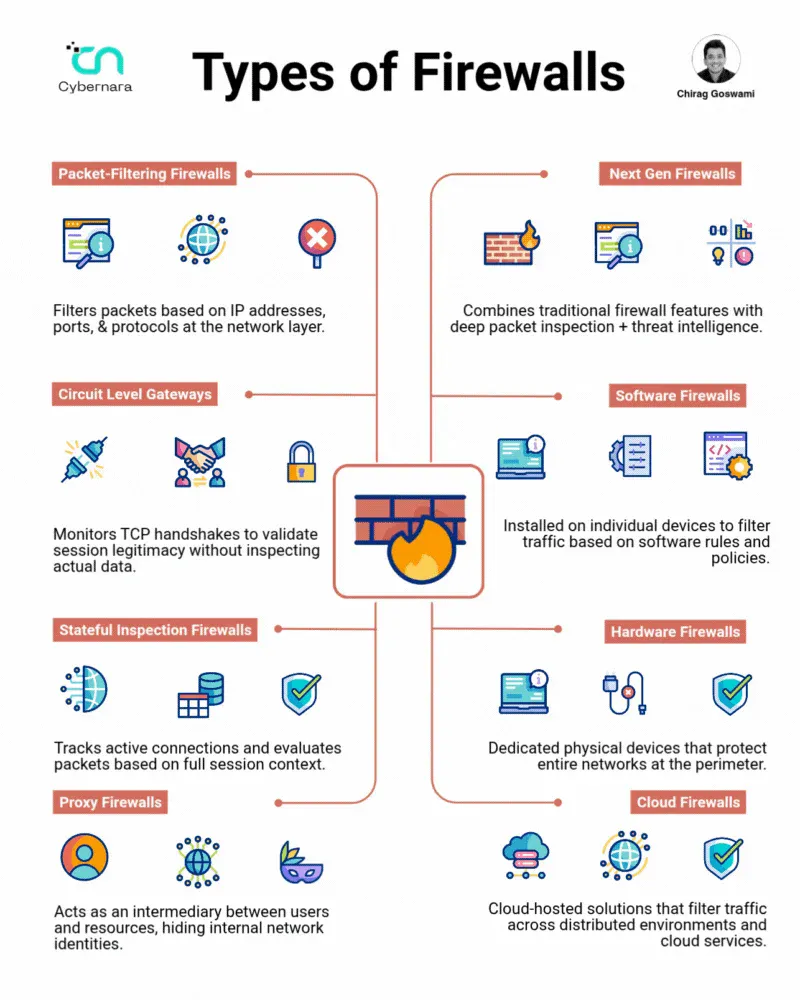
What they do: These are the OG firewalls – simple but effective. They examine each packet of data individually, checking basic information like:
- Source IP address (where it came from)
- Destination IP address (where it's going)
- Port numbers (what service it's trying to use)
- Protocol type (TCP, UDP, etc.)
Think of it like: A mail sorter who only looks at the return address and destination on envelopes, deciding whether to deliver them based on simple rules.
Pros:
- Lightning fast (minimal processing overhead)
- Cheap and easy to implement
- Works well for basic network segmentation
- Low resource requirements
Cons:
- No context awareness (can't see the big picture)
- Vulnerable to IP spoofing attacks
- Can't inspect packet contents
- Struggles with complex protocols that use dynamic ports
Real-world example: Your home router likely uses packet filtering to block certain ports or IP ranges. A company might use it to block all traffic from certain countries or allow only specific IP addresses to access their servers.
Circuit Level Gateways: The Handshake Validators
What they do: These firewalls focus on validating TCP handshakes – the "hello, let's talk" process that happens when two computers want to communicate. They don't care about the actual data being sent, just whether the connection was established properly.
Think of it like: A security guard who checks that visitors properly signed in at the front desk but doesn't search their bags.
How it works:
- Monitors the TCP three-way handshake (SYN, SYN-ACK, ACK)
- Verifies the connection follows proper protocol rules
- Creates a circuit between internal and external systems
- Relays data without inspecting content
Pros:
- Fast processing (only validates connections)
- Good for hiding internal network structure
- Efficient for legitimate traffic
- Works well with NAT (Network Address Translation)
Cons:
- No content inspection means malware can slip through
- Vulnerable to attacks that exploit valid connections
- Limited logging capabilities
- Can't detect application-layer attacks
Real-world example: SOCKS proxies often work at the circuit level, allowing applications to make network connections through the proxy while the firewall validates that the connections are legitimate.
Stateful Inspection Firewalls: The Context-Aware Guards
What they do: These are the smart cookies of the firewall world. They keep track of active connections and understand the context of network traffic. Instead of looking at packets in isolation, they maintain a "state table" of all ongoing connections.
Think of it like: A security guard who remembers everyone who entered the building and tracks what they're doing, making decisions based on the full story.
Key features:
- Connection tracking: Maintains a table of all active connections
- Dynamic port opening: Automatically opens ports for related traffic
- Sequence number tracking: Prevents TCP hijacking attacks
- Timeout management: Closes stale connections automatically
Pros:
- Much more secure than packet filtering
- Understands connection context
- Can handle complex protocols (like FTP) that use multiple ports
- Prevents many common attacks (TCP sequence attacks, etc.)
Cons:
- Higher resource usage (memory for state tables)
- More complex to configure properly
- Can be overwhelmed by connection floods
- Still can't inspect application data
Real-world example: Most enterprise firewalls use stateful inspection. When you browse a website, the firewall remembers your outgoing request and automatically allows the website's response back through, even though it's coming from the internet.
Proxy Firewalls: The Digital Middlemen
What they do: Proxy firewalls act as intermediaries between your internal network and the outside world. Instead of allowing direct connections, they receive requests, evaluate them, and then make new connections on behalf of clients.
Think of it like: A personal assistant who takes your phone calls, decides if they're important, and either passes them along or handles them directly.
How they work:
- Client makes a request to the proxy
- Proxy terminates the client connection
- Proxy evaluates the request against security policies
- If approved, proxy makes a new connection to the destination
- Proxy relays data between client and server
Types of proxies:
- HTTP/HTTPS proxies: Web traffic filtering and caching
- SMTP proxies: Email security and spam filtering
- FTP proxies: File transfer monitoring and control
Pros:
- Complete protocol awareness and content inspection
- Can modify or block specific content
- Excellent logging and monitoring capabilities
- Hides internal network structure completely
- Can cache content for better performance
Cons:
- Significant performance overhead
- Can break some applications that don't work well with proxies
- More complex to configure and maintain
- Single point of failure
- May struggle with encrypted traffic
Real-world example: Corporate web proxies that block social media sites, scan downloads for malware, and log all web activity. Squid is a popular open-source proxy that many organizations use.
Next Generation Firewalls (NGFW): The AI-Powered Bouncers
What they do: NGFWs combine traditional firewall functions with advanced threat detection, application awareness, and often AI-powered analysis. They're like having a team of expert security analysts built into your firewall.
Key capabilities:
- Application identification: Recognizes applications regardless of port
- Deep packet inspection (DPI): Examines packet contents for threats
- Intrusion prevention: Actively blocks known attack patterns
- Threat intelligence: Uses global threat feeds for real-time protection
- User identity awareness: Makes decisions based on who the user is
- SSL/TLS inspection: Can decrypt and inspect encrypted traffic
Think of it like: A highly trained security expert with access to global intelligence databases, behavioral analysis tools, and the ability to spot threats other guards would miss.
Pros:
- Comprehensive threat protection
- Application-layer visibility and control
- Advanced threat detection capabilities
- Integration with threat intelligence feeds
- Granular policy control
Cons:
- Expensive (both initial cost and ongoing licensing)
- High resource requirements
- Complex to configure properly
- Can introduce latency
- May create privacy concerns with deep inspection
Real-world example: Palo Alto Networks, Fortinet, and Check Point NGFWs that can identify when someone is using Skype over port 80 (disguised as web traffic) and apply appropriate policies, or detect and block advanced persistent threats in real-time.
Software Firewalls: The Personal Bodyguards
What they do: These run on individual devices (computers, phones, etc.) and protect that specific device. They're your personal digital bodyguard.
Common types:
- Host-based firewalls: Built into operating systems (Windows Firewall, iptables)
- Personal firewall software: Third-party applications (ZoneAlarm, Comodo)
- Endpoint security suites: Comprehensive protection packages
Think of it like: A personal security guard assigned to each individual person rather than guarding the building entrance.
Pros:
- Protects devices even when they're not on the corporate network
- Can make decisions based on the specific device context
- Last line of defense against threats
- User can customize settings for their needs
Cons:
- Must be managed on every single device
- Users can disable or misconfigure them
- Performance impact on the device
- Doesn't protect against lateral network movement
Real-world example: Your laptop's Windows Defender Firewall blocking a suspicious program from accessing the internet, or a software firewall on your phone preventing apps from sending data to unknown servers.
Hardware Firewalls: The Dedicated Fortress Guards
What they do: These are physical devices specifically built for firewall functions. They sit at network perimeters and are purpose-built for security.
Types:
- Appliance-based: Pre-built hardware with firewall software
- Custom-built: General-purpose servers configured as firewalls
- Embedded: Firewall chips built into routers and switches
Think of it like: A dedicated security checkpoint building with professional guards, metal detectors, and surveillance systems.
Pros:
- High performance and throughput
- Dedicated resources (not competing with other applications)
- Tamper-resistant hardware
- Professional management interfaces
- Often include redundancy features
Cons:
- Higher upfront costs
- Physical space requirements
- Need specialized knowledge to maintain
- Can become single points of failure
- Fixed capacity (may need replacement as network grows)
Real-world example: Cisco ASA firewalls protecting corporate network perimeters, or SonicWall appliances in small business environments.
Cloud Firewalls: The Distributed Defenders
What they do: These are firewall services delivered from the cloud, protecting distributed environments and cloud-based resources. They can scale dynamically and protect resources wherever they are.
Types:
- Cloud-native firewalls: Built specifically for cloud environments (AWS WAF, Azure Firewall)
- Firewall-as-a-Service (FWaaS): Cloud-delivered firewall services (Zscaler, Cato Networks)
- Virtual firewalls: Traditional firewall software running in cloud VMs
Think of it like: A network of coordinated security teams that can quickly deploy anywhere in the world and share intelligence instantly.
Pros:
- Scales automatically with demand
- No hardware to maintain
- Global threat intelligence sharing
- Easy to deploy and manage remotely
- Cost-effective for distributed environments
Cons:
- Dependency on internet connectivity
- Data privacy concerns (traffic goes through third-party)
- Potential latency issues
- Less control over the infrastructure
- Ongoing subscription costs
Real-world example: A company using AWS WAF to protect their web applications from DDoS attacks and SQL injection attempts, or Zscaler providing secure internet access for remote workers without requiring VPN connections.
Choosing the Right Firewall: The Decision Matrix
For small home offices:
- Start with software firewalls on individual devices
- Use router-based packet filtering for basic network protection
- Consider cloud-based solutions for advanced features
For small businesses:
- Hardware firewalls for network perimeter protection
- Combine with software firewalls on critical devices
- Consider NGFW if budget allows for advanced threat protection
For large enterprises:
- Multi-layer approach with hardware NGFWs at the perimeter
- Software firewalls on all endpoints
- Cloud firewalls for distributed/cloud resources
- Proxy firewalls for granular application control
For cloud-first organizations:
- Cloud-native firewalls for cloud resources
- FWaaS for unified policy management
- Virtual firewalls for specific workloads
Common Firewall Attacks and Mitigations
Attack: Firewall Rule Evasion
- Technique: Using allowed protocols to tunnel forbidden traffic
- Mitigation: Deep packet inspection, application-aware firewalls
Attack: DDoS Overwhelm
- Technique: Flooding firewall with connections to exhaust resources
- Mitigation: Rate limiting, connection limits, cloud-based DDoS protection
Attack: Misconfiguration Exploitation
- Technique: Taking advantage of overly permissive rules
- Mitigation: Regular rule audits, principle of least privilege, automated compliance checking
The Future of Firewalls
The firewall landscape continues to evolve with trends like:
- Zero Trust Architecture: Treating all traffic as potentially hostile
- AI-powered threat detection: Machine learning for anomaly detection
- SASE (Secure Access Service Edge): Converging network and security functions
- Container and microservices protection: Firewalls adapted for modern application architectures
Key Takeaways for Security Beginners
- Layer your defenses: Use multiple types of firewalls for comprehensive protection
- Understand your traffic: Know what normal looks like in your environment
- Keep it simple: Start with basic protection and add complexity as needed
- Regular maintenance: Firewalls are only as good as their configuration and updates
- Monitor and log: Use firewall logs to understand and improve your security posture
Remember: A firewall is just one part of a comprehensive security strategy. It's your first line of defense, but not your only one. Combine firewalls with other security measures like antivirus, intrusion detection systems, and security awareness training for the best protection.
Want to dive deeper? Start by setting up a simple iptables firewall on a Linux VM, or explore cloud firewall offerings from major providers. Hands-on experience is the best teacher in cybersecurity!