
The Complete Guide to Microsoft Copilots: Navigating the AI-Powered Productivity Ecosystem in 2025

Introduction
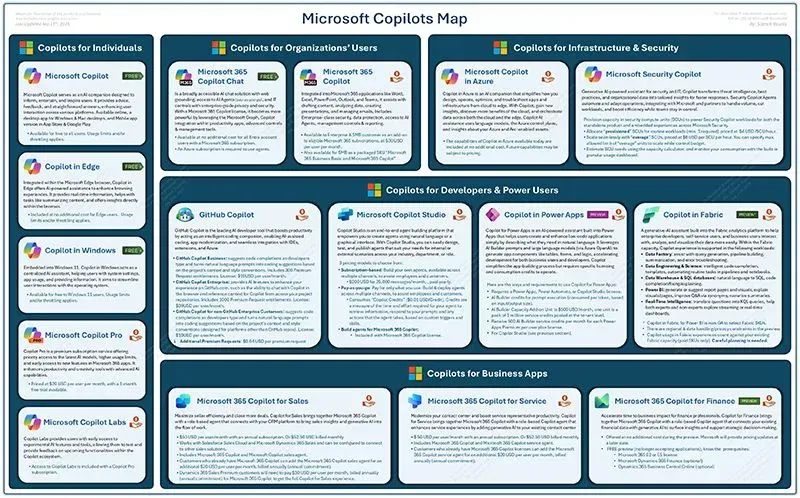
Microsoft has transformed the way organizations work with its comprehensive Copilot ecosystem—a suite of AI-powered assistants that spans from individual productivity tools to enterprise-scale solutions. The Microsoft Copilots Map you've shared provides a fascinating overview of how these AI assistants are organized across four key categories: Individuals, Organizations/Users, Infrastructure & Security, and Developers & Power Users, with Business Apps serving as a central hub.
As we navigate through 2025, with the introduction of GPT-5 smart mode in Microsoft Copilot and significant expansions across the platform, understanding this ecosystem has become crucial for organizations looking to leverage AI for competitive advantage. This comprehensive guide will explore each component of the Microsoft Copilot landscape, their interconnections, pricing models, and the strategic implications for businesses.
The Four Pillars of Microsoft Copilot
1. Copilots for Individuals
The foundation of Microsoft's consumer AI strategy begins with Microsoft Copilot (formerly Bing Chat), which serves as the entry point for individual users. This free tier provides AI-powered assistance for everyday tasks, web searches, and creative work. It's accessible through Bing.com, Microsoft Edge, and dedicated mobile apps.
Microsoft Copilot Pro elevates the individual experience at $20/month, offering:
- Priority access to the latest AI models during peak times
- Higher usage limits and faster performance
- Access to Copilot in Office apps (Word, Excel, PowerPoint, Outlook, OneNote)
- Early access to experimental features through Copilot Labs
- Custom GPT creation capabilities
The Copilot in Edge integration deserves special mention, as Microsoft recently introduced "Copilot Mode," an experimental feature that transforms Edge into a proactive, streamlined assistant by combining chat, search, and web navigation into a single input box.
Copilot in Windows continues to evolve as a system-wide AI assistant, providing contextual help, system management, and application integration directly from the Windows taskbar.
2. Copilots for Organizations/Users
This category represents the heart of Microsoft's enterprise AI strategy, with Microsoft 365 Copilot as its flagship offering.
Microsoft 365 Copilot
Priced at $30 per user per month for enterprise customers with Microsoft 365 E3, E5, Business Standard, or Business Premium licenses, Microsoft 365 Copilot transforms productivity across the entire Office suite:
- Word: Draft documents, summarize content, and refine writing
- Excel: Analyze data, create formulas, and generate insights
- PowerPoint: Design presentations and create visual content
- Outlook: Compose emails, summarize threads, and manage schedules
- Teams: Transcribe meetings, generate summaries, and facilitate collaboration
- Loop: Enable dynamic workspace AI collaboration
A significant development in 2025 is Microsoft 365 Copilot Chat, now available at no additional cost for all Entra account users with a Microsoft 365 subscription, providing secure, enterprise-ready AI chat with web grounding and IT controls.
Microsoft Copilot Studio
Copilot Studio is sold as tenant-wide Copilot Credit packs of 25,000 Copilot Credits each, priced at $200.00/pack/month. This platform enables organizations to:
- Build custom AI agents for specific business processes
- Create declarative agents that automate tasks
- Develop multi-agent orchestration systems
- Integrate with enterprise data sources through connectors
Recent enhancements include support for multi-agent orchestration, allowing agents built with Microsoft 365, Azure AI, and Microsoft Fabric to collaborate by delegating tasks and sharing results.
Specialized Role-Based Copilots
Microsoft 365 Copilot for Sales: Enhances CRM integration, provides customer insights, and automates sales workflows. The 2025 release wave focuses on surfacing further CRM insights and recommendations across the Microsoft 365 product suite.
Microsoft 365 Copilot for Service: Delivers cutting-edge generative AI capabilities for agents within their flow of work, helping service teams resolve issues faster.
Microsoft 365 Copilot for Finance: Focuses on intelligent automation of variance analysis in Excel, access to external data sources, and leveraging generative AI for summarizing macroeconomic conditions.
Microsoft Security Copilot: A specialized AI assistant for cybersecurity professionals that costs $4 per Security Compute Unit (SCU) per hour, with a single SCU running continuously costing about $35,000 per year.
3. Copilots for Infrastructure & Security
This pillar addresses the technical backbone and security requirements of enterprise AI deployment.
Microsoft Copilot
The enterprise version provides comprehensive AI capabilities with advanced security and compliance features, ensuring data protection and regulatory compliance across the organization.
Microsoft Security Copilot
This sophisticated security solution integrates with Microsoft's entire security stack including:
- Microsoft Defender XDR
- Microsoft Sentinel
- Microsoft Intune
- Microsoft Entra
- Microsoft Purview
- Azure security tools (WAF, Azure Firewall)
Security Copilot now supports Azure Lighthouse for MSSPs in public preview, enabling managed service providers to use Security Copilot with their customer tenants.
4. Copilots for Developers & Power Users
GitHub Copilot
The developer ecosystem centers around GitHub Copilot, which has become "the most widely adopted AI developer tool available for any platform". Available in multiple tiers:
- Individual: $10/month
- Business: $19/user/month
- Enterprise: $39/user/month
Key capabilities include:
- Code generation and completion
- Natural language to code translation
- Multi-language support
- Integration with popular IDEs
Microsoft Copilot Studio
Beyond its role in the organizational tier, Copilot Studio serves power users by enabling:
- Low-code/no-code agent development
- Natural Language Understanding (NLU+) for training high-accuracy models directly in Copilot Studio
- Integration with Microsoft Fabric for real-time analytics
Copilot in Power Apps
Enables citizen developers to build applications using natural language prompts, dramatically reducing the technical barrier to app development.
Copilot in Fabric
Fabric data agents connect directly to Microsoft OneLake data, automatically understanding schemas, enforcing governance policies, and interpreting business context to deliver timely, relevant insights.
Business Apps at the Center
The Business Apps category serves as the central hub connecting all four pillars:
Microsoft 365 Copilot for Sales
Provides AI-powered assistance for sales teams with CRM integration, customer insights, and workflow automation.
Microsoft 365 Copilot for Service
Enhances customer service capabilities with intelligent case routing, knowledge base integration, and automated response generation.
Microsoft 365 Copilot for Finance
Streamlines financial operations with automated analysis, reporting, and compliance features.
Pricing and Licensing Strategy
Microsoft's Copilot pricing reflects a sophisticated tiering strategy designed to capture value across different user segments:
Individual Tiers
- Microsoft Copilot (Free): Basic AI assistance
- Copilot Pro: $20/month for premium features
Business and Enterprise Tiers
- Microsoft 365 Copilot: $30/user/month (requires qualifying Microsoft 365 license)
- Copilot Studio: $200/month for 25,000 credits
- Security Copilot: $4/hour per SCU (minimum ~$35,000/year)
- GitHub Copilot Business: $19/user/month
- GitHub Copilot Enterprise: $39/user/month
A significant change in 2024 was the removal of the 300-seat minimum requirement, allowing businesses of any size to purchase single Copilot seats.
Latest Developments and Features (2025)
GPT-5 Integration
GPT-5 is now available in Microsoft Copilot across all markets and platforms, featuring a new Smart Mode that automatically adapts to tasks and routes users to the most capable model.
Enhanced Agent Capabilities
The Agent Store now features more than 70 agents, ranging from knowledge assistants to complex multi-modal orchestrators, accessible through Microsoft 365 Copilot Chat.
Voice and Mobile Enhancements
Voice interaction is rolling out for the Microsoft 365 Copilot mobile app on iOS, unlocking a faster, more intuitive way to work on the go.
Advanced Security Features
Microsoft Purview Data Loss Prevention (DLP) for Microsoft 365 Copilot now extends to everyday apps like Word, Excel, and PowerPoint, preventing Copilot from using files with specific sensitivity labels.
Strategic Implications for Organizations
1. Comprehensive AI Strategy Required
Organizations must develop a holistic approach to Copilot adoption, considering not just individual tools but the entire ecosystem's interconnections.
2. Security-First Implementation
With multiple Copilot services accessing organizational data, security and governance become paramount. The integration with Microsoft Purview and security tools ensures compliance while enabling innovation.
3. Custom Agent Development
The ability to create custom agents through Copilot Studio represents a significant opportunity for organizations to automate specific business processes and create competitive advantages.
4. Skills Development Priority
As AI assistants become integral to daily work, organizations must invest in training programs to ensure employees can effectively leverage these tools.
5. ROI Measurement Framework
With substantial licensing costs, especially for enterprise deployments, organizations need robust frameworks to measure and demonstrate AI investment returns.
Implementation Best Practices
Phase 1: Foundation
- Start with Microsoft 365 Copilot Chat (free tier) for initial exposure
- Conduct pilot programs with specific departments
- Establish governance and security policies
Phase 2: Expansion
- Roll out role-based Copilots to specialized teams
- Begin custom agent development with Copilot Studio
- Integrate with existing business systems
Phase 3: Optimization
- Develop organization-specific agents
- Implement multi-agent orchestration
- Measure and optimize based on usage analytics
Future Outlook
The Microsoft Copilot ecosystem continues to evolve rapidly. Key trends to watch include:
- Deeper Integration: Expect tighter integration between different Copilot services
- Industry-Specific Solutions: More specialized Copilots for specific industries
- Advanced Reasoning: Enhanced AI capabilities for complex problem-solving
- Autonomous Agents: Greater autonomy in agent decision-making and task execution
- Cross-Platform Expansion: Broader availability across devices and platforms
Conclusion
The Microsoft Copilots Map represents more than just a product portfolio—it's a comprehensive vision for AI-augmented work across every level of an organization. From individual productivity enhancement to enterprise-scale transformation, the Copilot ecosystem provides tools for every user and use case.
Success with Microsoft Copilots requires more than just purchasing licenses. Organizations must thoughtfully integrate these tools into their workflows, develop custom solutions for their specific needs, and continuously evolve their AI strategy as capabilities expand.
As we progress through 2025, the organizations that effectively leverage this ecosystem will find themselves with significant competitive advantages—faster decision-making, enhanced productivity, and the ability to tackle complex challenges that were previously impossible to solve at scale.
The journey to AI-powered productivity isn't just about technology adoption; it's about reimagining how work gets done in the age of artificial intelligence. The Microsoft Copilot ecosystem provides the foundation—how organizations build upon it will determine their success in the AI era.
For the latest updates on Microsoft Copilot features and pricing, visit the Microsoft 365 Roadmap and consult with your Microsoft account representative for enterprise licensing options.